Choosing Your SNOMED CT Browser GUI vs API
 Dr. Emily Watson
A SNOMED CT browser is your guide through the massive, interconnected world of clinical terminology. Think of it as a specialized search engine built specifically for medical concepts. It lets you find, explore, and actually understand the millions of terms inside SNOMED CT and, just as importantly, the complex web of relationships that tie them all together.
At a high level, these browsers come in two primary flavors: a visual web-based GUI for hands-on exploration and a programmatic API designed for automated, large-scale data work.
Understanding the Role of a SNOMED CT Browser

Imagine trying to navigate a sprawling city without a map or GPS. That's what working with SNOMED CT would be like without a browser. With over 350,000 unique concepts and millions of relationships, the terminology is far too dense for anyone to manage on their own. This tool is what helps developers, researchers, and clinicians make practical sense of the intricate hierarchy.
But not all browsers are built for the same job. The choice between a web GUI and an API isn't just a technical detail-it’s a fundamental decision that shapes your entire workflow. This distinction is crucial for anyone handling healthcare data, whether you're a data engineer building an ETL pipeline or a researcher defining a complex patient cohort.
The Two Faces of a SNOMED CT Browser
The real difference comes down to how you interact with the terminology. Your project's goals will point you to the right tool.
- Web GUI (Graphical User Interface): This is the visual, point-and-click interface that most people are familiar with. It's perfect for manual lookups, for learning the terminology, or for a clinician who needs to quickly verify a specific code. It’s great for one-off exploration but falls short for anything repetitive or at scale.
- API (Application Programming Interface): This is the developer's gateway. An API allows software applications to talk directly to the SNOMED CT terminology service. It’s the engine for automation, powering tasks like mapping thousands of local lab codes to standard concepts or programmatically finding all subtypes of a specific disease.
For developers and data engineers, the API isn't just an option; it's the essential tool for building workflows that are both scalable and efficient. Picking the right tool from the start is what separates efficient, automated data operations from slow, manual ones.
Key Takeaway: A web GUI is for exploring the map one landmark at a time. An API is for automating the entire journey, letting your applications navigate the complex terrain of clinical data at machine speed.
Why This Choice Matters for Developers
For any technical professional, relying only on a manual GUI creates immediate and painful bottlenecks. Imagine you need to standardize a dataset with one million patient records, where each record has a handful of clinical codes. Searching for each one by hand is simply not feasible.
This is exactly the problem an API-driven SNOMED CT browser solves. It enables automation. To see how this works in practice, you can dive into our detailed guide on semantic mapping in healthcare.
The rest of this guide will break down these two approaches with practical examples and clear use cases. We'll show you when the simplicity of a GUI is all you need and when to bring in the power of an API to tackle demanding, real-world healthcare data challenges.
Exploring SNOMED CT with the Web GUI
Think of a web-based SNOMED CT browser as your manual window into the vast world of clinical terminology. It’s the perfect tool for one-off lookups, educational deep-dives, or when a clinician just needs to visually confirm a single concept. It's less like a high-speed data processor and more like a detailed digital encyclopedia for medical terms.
Through a simple point-and-click interface, you can search for terms, trace a concept’s lineage by exploring its parents and children, and examine its defining attributes. This hands-on, visual approach is a fantastic starting point for non-technical users or developers getting their feet wet with SNOMED CT. It helps build a solid mental model before you even think about writing code.
The Power of Visual Exploration
The real magic of a GUI browser is how it makes abstract hierarchies feel concrete. It’s one thing to be told that "Viral pneumonia" is related to "Infectious disease," but it's another thing entirely to see that connection mapped out right in front of you. This immediate visual feedback cuts through the complexity and clarifies relationships that can get lost in raw data files.
For instance, the screenshot below from the official SNOMED CT browser shows the concept for "Viral pneumonia" in its natural habitat.
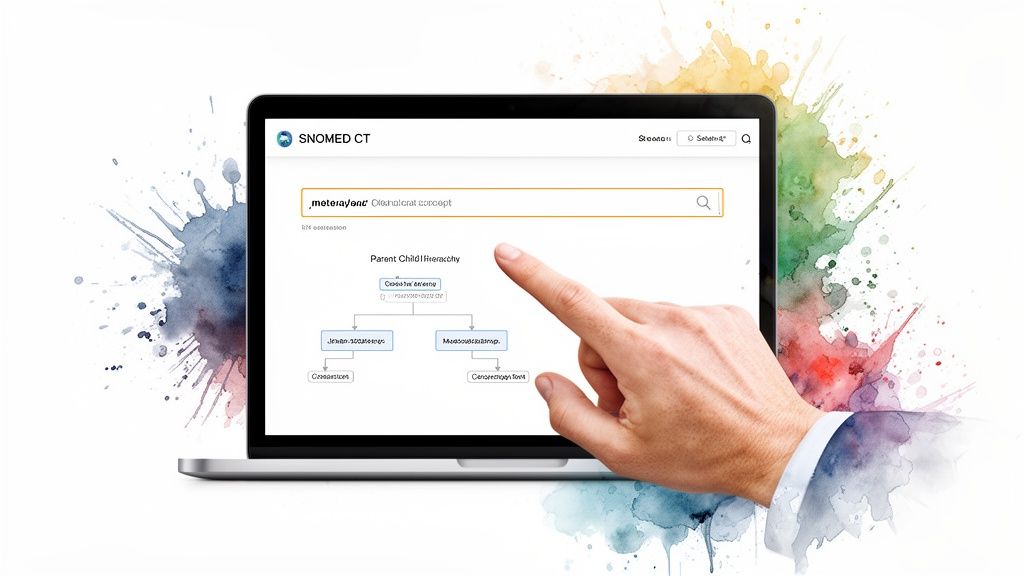
You can clearly see that "Viral pneumonia" is a child of "Infectious pneumonia" and a parent to more specific types. This visual confirmation of its place in the hierarchy is indispensable for manual validation, learning, and building intuition.
Limitations for Scalable Workflows
But the GUI's greatest strength-its simplicity-is also its biggest weakness. It just wasn't built for automation. Every single search is a manual click, which makes it impossible to integrate into a real data pipeline for ETL, analytics, or machine learning.
Trying to process even a few hundred concepts this way would be a painfully slow and error-prone nightmare. The browser is the perfect tool for learning the map, but you can’t use it to drive the car when you have thousands or millions of records to process. That's where programmatic access becomes non-negotiable.
Tip for Newcomers: Spend some time with the web GUI before you write a single line of code. Manually search for a few concepts central to your project. This hands-on exploration will give you a feel for the data's structure and can help you avoid painful logic errors in your automated scripts down the road. For a closer look at vocabulary tooling, check out the official OMOPHub documentation.
A Global Resource for Clinical Data
The official SNOMED CT Browser has grown into a cornerstone resource for healthcare data engineers and ETL developers globally. It now hosts national editions from 19 countries, which together have contributed over 275,000 unique concepts and more than 2.1 million descriptions.
This incredible repository allows users to navigate everything from drug extensions and language translations to patient-friendly terms and maps to local codes. It also contains over 1,100 specialized subsets, all harmonized with the core International Edition. To grasp the full scope, you can read the research on these global terminology extensions and their impact on data interoperability.
Automating Workflows with a SNOMED CT API
Sooner or later, manual lookups just won't cut it. When you need to scale your operations, an API becomes your go-to tool. A SNOMED CT Browser API is essentially a gateway for your software to talk directly to the terminology, allowing it to query, navigate, and embed clinical concepts without any human clicking a mouse. Instead of a person searching a website, your code sends a request and gets clean, structured data back.
This is the engine that drives modern healthcare data platforms. It's the only way to achieve the kind of powerful automation needed for any serious data work.
From Manual Clicks to Automated Code
Making the jump from a graphical interface (GUI) to an API is a major step up in how you handle clinical data. The GUI is great for answering a single question here and there. The API is for building systems that can answer thousands of questions a minute, all on their own. It’s how professionals build resilient, scalable health-tech solutions.
With an API, you can bake terminology logic right into your applications. This opens the door to a ton of critical functions:
- ETL Jobs: You can programmatically map millions of records from messy local codes to standard SNOMED CT concepts.
- Cohort Building: Need to find every patient with a specific type of cancer? An API can traverse the complex SNOMED CT hierarchy to automatically pull all relevant subtypes of neoplasms.
- AI and Analytics: Feeding clean, standardized data to machine learning models is crucial. An API ensures your models get consistent terminology, which boosts accuracy and cuts down on bias.
Using a managed service like OMOPHub, which offers a ready-made SNOMED CT API, saves you from the massive headache of hosting and maintaining the vocabularies yourself. Developers can just connect to a reliable endpoint and forget about the infrastructure, version updates, and uptime.
Practical Use Cases for API-Driven Workflows
The real power of a SNOMED CT API shines through in complex, automated workflows. Take an electronic health record (EHR) system, for instance. An API can work behind the scenes to power real-time clinical decision support, instantly mapping a doctor's free-text notes to a standard SNOMED CT code.
In life sciences, researchers can use an API to automate finding eligible patients for a clinical trial. The system can query millions of records for specific diagnostic codes and all their related sub-concepts-a task that would take weeks by hand can be done in minutes.
Tip for Developers: Before you start coding, fire up a tool like Postman or Insomnia and make a few test calls to the API endpoints. It’s the fastest way to get a feel for the request structure and the JSON response format, which will save you a ton of time later. You can find more hands-on guidance in the OMOPHub documentation.
When you're building knowledge base agents or similar applications that need to retrieve and process information automatically, a SNOMED CT API gives you that direct, programmatic line into the world of clinical terminology.
Leveraging SDKs for Faster Integration
To make things even easier, you can use a Software Development Kit (SDK). An SDK is just a bundle of pre-written code that takes care of the tedious parts of API integration, like making HTTP requests, handling authentication, and parsing the data that comes back. Instead of writing all that from scratch, you just call simple functions.
This approach drastically cuts down on development time and helps avoid common mistakes. For example, the OMOPHub Python SDK and R SDK give you straightforward methods for searching concepts or walking the hierarchy. It lets you focus on your application’s logic, not the plumbing of API communication. And as you map out your data strategy, our guide on converting ICD-10 to ICD-9 might come in handy for dealing with older data systems.
GUI vs. API: Choosing the Right Tool for the Job
Deciding between a SNOMED CT browser’s graphical user interface (GUI) and its API isn't just a technical detail-it's a fundamental choice that shapes how you work with clinical data. Get this wrong, and you could end up with a manual, time-consuming process where automation was needed, or an over-engineered solution for a simple lookup.
A good way to think about it is this: the GUI is like using a magnifying glass. It’s perfect when you need to carefully inspect a single concept, understand its relationships, and confirm its details with your own eyes. The API, on the other hand, is like deploying a fleet of drones to survey the entire forest at once, mapping every tree programmatically. One is for detailed, manual inspection; the other is for automated, large-scale analysis.
SNOMED CT Browser GUI vs API At a Glance
The core difference really comes down to who-or what-is doing the work. A human uses the GUI, while a machine or script uses the API. This single distinction has a massive ripple effect on speed, scalability, and how deeply you can weave terminology services into your workflows.
Here’s a straightforward breakdown of how they stack up.
| Feature | Web GUI (Manual Browser) | API (Programmatic Access) |
|---|---|---|
| Primary Use Case | Manual lookup, learning, and visual validation of single concepts. | Automated, large-scale data processing, ETL, and application integration. |
| Scalability | Low. Limited to what a single user can manually click and search. | High. Built to handle thousands of requests per second from software. |
| Speed | Slow. Each lookup is a manual action that takes seconds to minutes. | Extremely Fast. Operations are executed in milliseconds. |
| Integration | None. It's a standalone tool that cannot be embedded into other software. | Seamless. Designed to be integrated directly into applications and data pipelines. |
| Technical Overhead | Low. Requires no coding knowledge; just a web browser. | Moderate. Requires development skills and an understanding of APIs. |
As you can see, they’re built for completely different worlds. The GUI is for exploration and one-off tasks, while the API is the engine for building robust, data-driven systems.
This decision tree gives you a quick visual guide for which path to take.
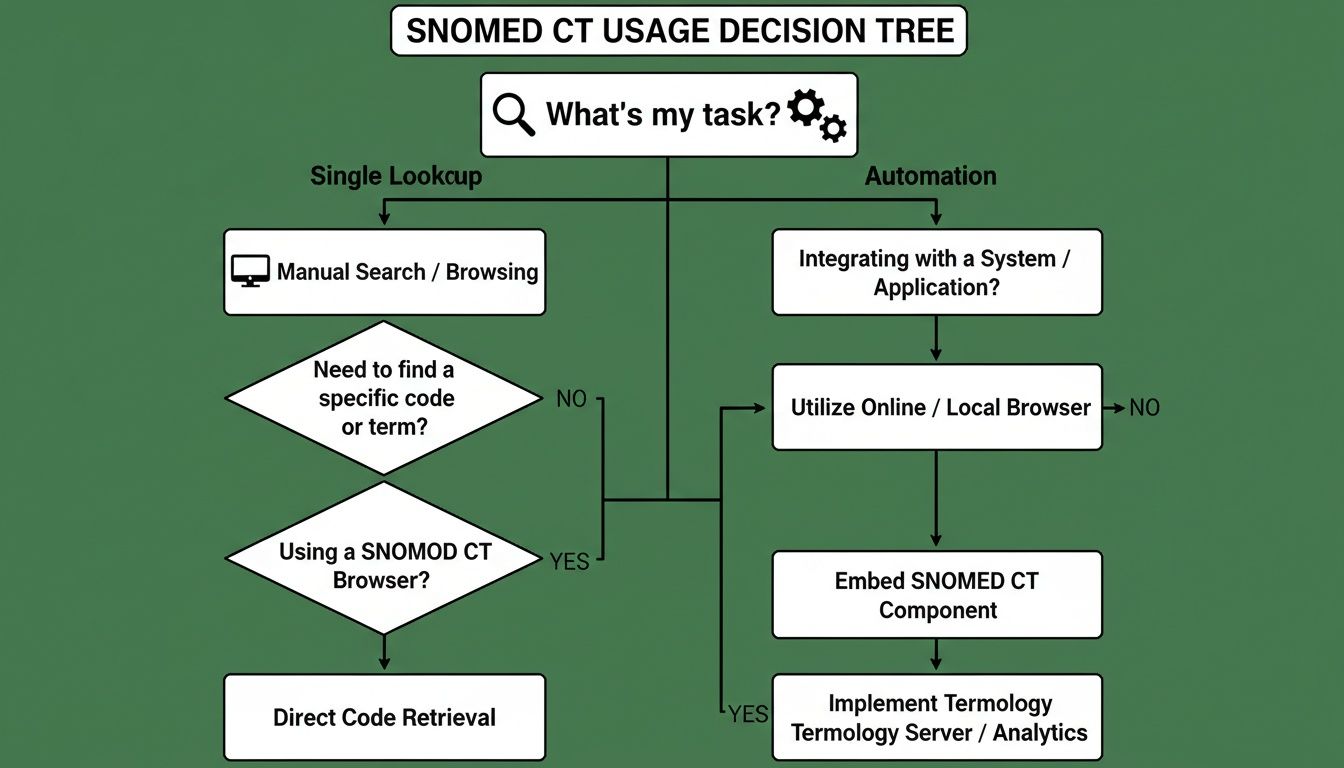
If you're doing something once, the GUI is your friend. If you need to do it more than once-or on thousands of records-the API is the only logical choice.
Real-World Scenarios for Picking Your Tool
Let’s make this more concrete with a couple of scenarios that data scientists, researchers, and developers run into all the time.
Scenario 1: The Clinical Researcher Imagine a researcher building a small study on "viral pneumonia." They need to validate a list of about a dozen SNOMED CT codes to make sure their patient cohort is defined correctly. They want to check the concepts, see their direct parents and children, and confirm the descriptions match their clinical intent.
- Best Tool: The Web GUI.
- Why: This is a small, finite task that demands careful visual inspection. Firing up a browser, typing in the concepts, and clicking through the hierarchy is fast, intuitive, and gives the researcher complete confidence. Writing code to use an API here would be a classic case of over-engineering.
Scenario 2: The ETL Developer Now, picture an ETL developer working to standardize millions of lab results from a hospital's legacy system. They have a source file with 500,000 records, and each one has a local, non-standard lab code that needs to be mapped to the correct SNOMED CT concept.
- Best Tool: The API.
- Why: Manually looking up half a million codes is not just impractical; it’s impossible. This is precisely what APIs are built for. The developer can write a script that reads each record, sends the local code to the API, gets the corresponding SNOMED CT code back, and writes it to a new, standardized database. It’s automated, repeatable, and scalable.
A Quick Tip for Developers: Don't reinvent the wheel. Instead of writing all the boilerplate code for handling API requests, authentication, and error checking from scratch, use an established SDK. The official OMOPHub Python SDK and R SDK wrap all that complexity into simple functions. This lets you focus on your core task, not the plumbing. You can find plenty of working examples in the OMOPHub documentation.
In the end, it’s all about matching the tool to the task. Don’t bring a manual clicker to an automated firefight, and don't complicate a simple lookup with a full-blown API integration.
Practical API Examples with the OMOPHub Python SDK
Theory is one thing, but putting a SNOMED CT browser API to work is where you see the real magic happen. A good GUI is fantastic for poking around and visually exploring concepts. An API, on the other hand, is built for the heavy lifting-automation, integration, and scale.
Let's walk through some hands-on, copy-paste-ready code examples using the OMOPHub Python SDK. These aren't just abstract exercises; they solve three of the most common problems developers face: standardizing messy clinical terms, building patient cohorts by walking the SNOMED CT hierarchy, and mapping local codes to standard concepts.
Use Case 1: Searching for a Standard Concept
This is the bread and butter of data standardization. A clinician writes "Heart attack" in their notes, an old billing system has "MI," but the standard SNOMED CT concept is "Myocardial infarction." Your job is to find that standard concept programmatically to create clean, uniform data.
With the OMOPHub Python SDK, this complex lookup becomes a simple function call. You send the query, and the API hands back a structured list of matching concepts with their ID, name, and vocabulary.
# First, install the SDK
# pip install omophub

import os
from omophub.client import Client

# Initialize the client with your API key
client = Client(api_key=os.environ.get("OMOPHUB_API_KEY"))

# Search for the standard concept for 'Myocardial infarction'
search_results = client.vocabulary.search(
    query="Myocardial infarction",
    standard_concept="Standard"
)

# Print the top result to see the standard concept details
if search_results.concepts:
    top_result = search_results.concepts[0]
    print(f"Query: 'Myocardial infarction'")
    print(f"  - Standard Concept Name: {top_result.concept_name}")
    print(f"  - Concept ID: {top_result.concept_id}")
    print(f"  - Vocabulary: {top_result.vocabulary_id}")
else:
    print("No standard concepts found for the query.")

# Expected Output:
# Query: 'Myocardial infarction'
#   - Standard Concept Name: Myocardial infarction
#   - Concept ID: 312327
#   - Vocabulary: SNOMED
This tiny script automates a task that would take ages to do manually, letting you process thousands of terms in the blink of an eye. For more fine-grained control, the official OMOPHub SDK documentation covers all the advanced filtering options.
Use Case 2: Traversing Concept Relationships
Building a truly robust patient cohort is rarely about finding a single code. Imagine you need to identify all patients with any form of cancer. You can't just search for the top-level "Neoplasm" concept; you need to find all of its descendants-thousands of specific codes for every tumor imaginable.
This is where a SNOMED CT browser API proves its worth. The code below takes the parent concept for "Neoplasm" and effortlessly retrieves every single descendant concept.
# Continuing with our initialized client

# Define the parent concept ID for 'Neoplasm'
neoplasm_concept_id = 4164138

# Retrieve all descendant concepts
descendants = client.vocabulary.get_descendants(concept_id=neoplasm_concept_id)

# Print the total count and a few examples
print(f"Found {len(descendants.concepts)} descendant concepts for 'Neoplasm'.")
print("Here are a few examples:")
for concept in descendants.concepts[:5]:
    print(f"  - {concept.concept_name} (ID: {concept.concept_id})")

# Expected Output:
# Found 16187 descendant concepts for 'Neoplasm'.
# Here are a few examples:
#   - Tumor of hematopoietic and lymphoid tissues (ID: 4001759)
#   - Disease of hematopoietic and lymphoid tissues (ID: 4001758)
#   - Tumor of lymphoid tissue (ID: 4167389)
#   - Tumor of hematopoietic tissue (ID: 4001760)
#   - Malignant lymphoma (ID: 432571)
Can you imagine trying to do this in a GUI? You'd be clicking through thousands of branches in the hierarchy until your fingers fell off. Programmatic access is the only sane way to do it.
This shift to programmatic use is a well-documented trend. Between 2013 and 2020, research publications focused on SNOMED CT 'implementation' grew from 9.0% to 19.9% across more than 50 countries. This highlights exactly why API-driven access is so vital for AI and machine learning: it frees up teams from wrestling with local files so they can focus on high-impact work, like traversing relationships for clinical NLP. You can dig into the findings on SNOMED CT implementation trends to see the data for yourself.
Use Case 3: Mapping Across Vocabularies
Finally, a classic ETL headache: mapping codes from a source system, like ICD-10-CM, into a standard vocabulary like SNOMED CT. This is a critical step for loading data into a common data model. The OMOPHub API gives you a direct path to find these relationships.
This last snippet shows how to find the standard SNOMED CT concept that corresponds to the ICD-10-CM code for "Type 2 diabetes mellitus." This is a foundational task for preparing data for the OMOP Common Data Model. If you're new to OMOP, our guide to the OMOP CDM is a great place to start.
# Continuing with our initialized client

# Define the source concept ID for 'Type 2 diabetes mellitus' in ICD10CM
# You can find this ID using the search function from the first example
source_concept_id = 45579219

# Find the standard concepts it maps to
mapping_results = client.vocabulary.get_concept_maps(concept_id=source_concept_id)

# Print the mapping result
if mapping_results.concepts:
    mapped_concept = mapping_results.concepts[0]
    print(f"ICD10CM code for 'Type 2 diabetes mellitus' maps to:")
    print(f"  - SNOMED CT Name: {mapped_concept.concept_name}")
    print(f"  - SNOMED CT ID: {mapped_concept.concept_id}")
else:
    print("No mapping found for the source concept.")

# Expected Output:
# ICD10CM code for 'Type 2 diabetes mellitus' maps to:
#   - SNOMED CT Name: Type 2 diabetes mellitus
#   - SNOMED CT ID: 201826
Pro Tip: When building ETL pipelines, never assume a mapping will exist. Your code should always include logic to flag or log unmapped source codes for manual review. This simple step is crucial for maintaining data integrity.
These examples are just the tip of the iceberg, but they show how much more efficient a snomed ct browser API can make your work. By integrating the OMOPHub Python SDK or the OMOPHub R SDK, you can inject these powerful terminology services directly into your applications and dramatically speed up your data standardization, cohort building, and analytical workflows.
Keeping Your SNOMED CT Implementation Fast, Compliant, and Scalable
When you move beyond simple lookups and start building enterprise-grade applications, the game changes. Performance, compliance, and scalability become non-negotiable. For engineering leads and compliance officers, these aren't just technical details; they are critical operational challenges when you're dealing with sensitive clinical data.
Thinking about self-hosting a SNOMED CT terminology server? It might seem like the direct path at first, but the hidden costs in time and resources add up quickly.

Suddenly, your team is bogged down managing version updates, keeping infrastructure performant and highly available, and navigating a maze of regulatory requirements. A managed API solution like OMOPHub is built to take that entire burden off your plate, turning a massive infrastructure project into a simple, secure API call.
Fortifying Performance at Scale
Imagine a SNOMED CT browser function embedded directly into an EHR or a real-time analytics dashboard. Speed is everything. A slow query isn't just an inconvenience-it can disrupt a clinical workflow and make a critical tool practically useless. This is where a managed API's multi-layered performance strategy really shines.
- Intelligent Caching: Common concepts and their relationships are automatically cached, which means frequently run queries get answered almost instantly.
- Global Edge Distribution: With API endpoints spread across the globe, user requests are handled by a server that's physically close, slashing network latency.
- Optimized Infrastructure: The entire backend, from the database to the query engine, is fine-tuned specifically for complex terminology operations-something that's incredibly difficult to replicate in a general-purpose, self-hosted environment.
This kind of architecture is how you achieve consistent sub-50ms response times, a benchmark that’s essential for any interactive application. To really dig into what it takes to ensure API reliability, this Ultimate Guide to API Load Testing is a great resource.
Built-In Compliance and Security
From a compliance officer's perspective, a self-hosted solution is a minefield of regulatory risk. A professional API, on the other hand, bakes compliance right into the service. Features like end-to-end encryption are standard, so you know data is secure whether it's moving across the network or sitting at rest.
Even better, immutable audit trails provide a complete and unchangeable log of every single API call. This gives you the transparency required to meet strict regulations like HIPAA and GDPR, which is absolutely critical as terminology services become more globally interconnected.
SNOMED International's own browser is a perfect example of this global expansion. Membership has grown from just 19 countries in 2012 to an expected 50 by 2025. A compliant API with sub-50ms performance is the key to tapping into this growth without getting bogged down by infrastructure hurdles.
Ultimately, choosing a professional API for your SNOMED CT browser needs isn't just about making a developer's life easier. It's a strategic move to build secure, scalable, and compliant healthcare systems from the very foundation.
Frequently Asked Questions
Diving into clinical terminologies like SNOMED CT can feel overwhelming, and it's natural to have questions about the best tools for the job. Let's tackle some of the most common things developers ask when weighing a GUI browser against an API.
Which Tool Is Better for Beginners?
If you're just getting your feet wet with SNOMED CT, a web GUI is absolutely the best place to start. There's no substitute for being able to visually click through the hierarchies, explore concepts, and see how they all connect without having to write a single line of code.
This hands-on approach builds an intuitive feel for the terminology. Once you have that solid foundation, moving on to automate tasks with an API becomes much easier. A good first step is to simply look up a few terms you're already familiar with from your project to see how they're structured.
For a deeper dive, the official OMOPHub documentation has some great examples to get you started.
Can I Use the GUI for Data Mapping Projects?
You could, but you probably shouldn't. While the web GUI is fine for looking up a handful of codes, it just doesn't scale for any real-world data mapping or ETL pipeline.
Imagine manually searching for hundreds-or thousands-of source codes one by one. It’s not only incredibly slow but also a recipe for mistakes. For anything beyond a small, one-off task, an API is the only practical choice. It gives you the speed and reliability you need for production workloads.
How Does an API Handle SNOMED CT Version Updates?
This is where a managed API really shines. If you decide to host SNOMED CT yourself, your team is on the hook for every single version release. That means downloading, processing, and deploying the new files from SNOMED International, which is a significant, ongoing maintenance headache.
A managed service like OMOPHub takes care of all of this for you. All vocabulary updates happen automatically behind the scenes. Your applications get seamless access to the latest official terminology, keeping your data current and compliant without any effort from your team.
If you want to see how this works in practice, check out the OMOPHub Python SDK.
Ready to stop wrestling with terminology databases and get back to building? With OMOPHub, you get instant API access to SNOMED CT and other critical healthcare vocabularies, all with enterprise-grade performance. Ditch the infrastructure burden and speed up your development at https://omophub.com.