A Developer's Guide to SNOMED CT Codes Lookup
 Robert Anderson, PhD
A fast, accurate snomed ct codes lookup can shrink a month-long data harmonization project down to a few minutes. It's the essential step that turns messy, complex clinical notes into standardized, analyzable data. For any developer or researcher working in modern healthcare, getting this right isn't just a nice-to-have-it's a core competency.
Why Mastering SNOMED CT Codes Lookup Is Critical
SNOMED CT is more than just a list of codes; it’s a vast, interconnected web of over 350,000 clinical concepts. Its deep, hierarchical structure is what makes true clinical data interoperability possible. Getting this right means a diagnosis recorded in a hospital in Berlin is understood in exactly the same way as one in Boston. If you want a deeper dive on the fundamentals, we’ve covered the basics in our detailed article on what SNOMED CT is.
The Real-World Impact of Efficient Lookups
Let's make this tangible. Picture a clinical researcher trying to build a patient cohort for an oncology trial that spans several hospital networks. Each hospital likely uses slightly different local terminology for the same type of cancer. Without an efficient lookup method, someone has to map all that data manually. We're talking about a project that could easily eat up weeks, if not months.
A powerful snomed ct codes lookup capability completely changes the game. That same researcher can now programmatically search for a high-level concept like "Malignant neoplasm of breast" and get back all the more specific subtypes in an instant. What was once a data harmonization nightmare becomes a quick, automated query.
Overcoming Common Vocabulary Hurdles
For many organizations, the alternative is managing these massive medical vocabularies in-house, which creates a ton of operational drag. The headaches are predictable and expensive:
- Versioning Nightmares: Keeping your local database perfectly synced with the latest SNOMED CT releases from OHDSI ATHENA is a relentless maintenance task.
- Maintenance Overhead: The infrastructure needed to host, index, and secure a vocabulary database of this scale pulls your engineers away from building your actual product.
- Slow Query Times: If your local database isn't perfectly optimized, you get sluggish performance. This kills the user experience in interactive apps and bogs down large-scale data processing jobs.
The value of SNOMED CT is clear in its ability to power multi-institutional studies with harmonized datasets across continents. It drives evidence-based care by facilitating early health issue detection, reducing duplicate testing, and cutting adverse drug events, which also yields significant cost savings. Discover more insights about these SNOMED CT benefits.
We built OMOPHub specifically to make these problems disappear. By offering a developer-first platform with instant API access to all OHDSI ATHENA vocabularies, we take the entire infrastructure burden off your plate. This lets your team get back to focusing on what they do best: building innovative healthcare solutions, not managing databases.
Mastering Quick Manual SNOMED CT Lookups
Before you even think about writing a script, every data professional working with clinical information needs to master the art of the quick manual snomed ct codes lookup. It’s a foundational skill. Whether you're quickly validating a single code you found in a dataset, exploring a new clinical area, or just trying to get a gut feeling for how the terminology is structured, a manual check is your fastest first step. It’s how you confirm your assumptions before sinking time into automation.
For this kind of ad-hoc work, the OMOPHub Concept Lookup tool is my go-to. It’s a straightforward web interface that lets you search the entire OHDSI ATHENA vocabulary catalog, which of course includes SNOMED CT. This is where you can explore and validate concepts on the fly, building a solid understanding before you move on to programmatic searches.
Getting Your Hands Dirty with the Concept Lookup Tool
Let's walk through a common, real-world scenario. You're working with cardiovascular data and need the standard concept for a heart attack. You’d head over to the OMOPHub Concept Lookup tool, type "Myocardial Infarction" into the search bar, and instantly get back a clean, structured list of results.
Here’s exactly what that looks like:
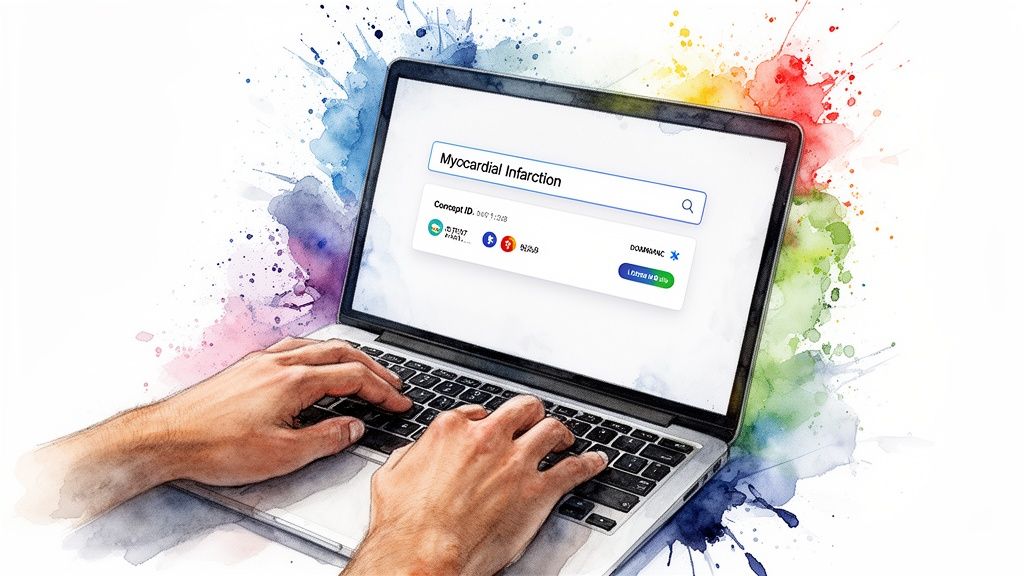
This simple search immediately gives you everything you need to know. The interface clearly lays out the Concept ID, Name, Domain, Vocabulary, Class, and Standard status for every matching term.
Having this feedback loop is incredibly powerful. You can see right away that the standard concept for "Myocardial infarction" is Concept ID 4329847, and it lives in the 'Condition' domain. You'll also spot other non-standard concepts in the list, which serves as a great visual reminder of why filtering for the correct standard concept is so critical in your data pipelines.
Pro Tip: Always keep an eye on the 'Standard Concept' column. An 'S' means it's the standard, preferred concept for analysis within the OMOP Common Data Model. Any non-standard concepts ('N') or classification concepts ('C') should almost always be mapped to their standard equivalent to keep your data clean and consistent.
A Deeper Dive: Interpreting the Concept Details
When you see a list of results, each column tells an important part of the story. Understanding these fields is key to picking the right concept every time.
Here's a quick breakdown of what you're looking at in the tool.
Interpreting SNOMED CT Concept Details
| Field | What It Means | Why It Matters for Your Lookup |
|---|---|---|
| Concept ID | The unique integer that identifies this specific concept. | This is the primary key you'll use in your databases and scripts. It's the unambiguous identifier for the term. |
| Name | The official, human-readable description of the concept. | This is your primary way to confirm you've found the right clinical idea. |
| Domain | The high-level category the concept belongs to (e.g., Condition, Procedure, Drug). | Essential for filtering. It ensures you're looking at a diagnosis when you need a diagnosis, not a lab test. |
| Vocabulary | The source terminology (e.g., SNOMED, LOINC, RxNorm). | Confirms the concept is from SNOMED CT and helps you understand its origin if you're dealing with multiple vocabularies. |
| Class | A more granular category within the vocabulary (e.g., Clinical Finding, Procedure). | This adds context. A 'Clinical Finding' is different from a 'Disorder,' which can be a subtle but important distinction. |
| Standard | Indicates if the concept is the standard ('S'), non-standard ('N'), or classification ('C'). | This is arguably the most critical field for OMOP users. Your analyses should almost always use standard concepts. |
Getting comfortable with these fields will dramatically speed up your manual lookups and reduce errors down the line.
Practical Tips from the Field
To really get the most out of manual searching, you need to think like the terminology. After years of doing this, I've found a few tricks that consistently help refine queries and interpret results more accurately. If you're looking for a slightly different approach to exploring the terminology, our guide on the SNOMED CT Browser offers another great perspective.
Here are a few pointers that will save you time:
- Embrace Synonyms: SNOMED CT is packed with synonyms. If your initial search for "Myocardial Infarction" isn't quite right, don't give up. Try a more common term like "Heart Attack." A good search tool is designed to understand these clinical equivalencies.
- Filter by Domain Aggressively: Your search results can get noisy fast. If you know you're only looking for diagnoses, filter the results to the 'Condition' domain right away. This instantly removes clutter from related procedures, drugs, or observations.
- Pay Attention to Concept Class: The 'Concept Class' provides that extra layer of detail. Knowing the difference between a 'Clinical Finding' and a 'Procedure' helps you select the term that precisely fits the clinical or analytical context you're working in.
Programmatic SNOMED CT Lookups with OMOPHub SDKs
Manual lookups are great for a quick check, but when you're an ETL developer or data scientist, you need to automate. This is where the real work gets done. Integrating SNOMED CT code lookups directly into your data pipelines and analytics scripts is how you handle data at scale, and the OMOPHub SDKs for Python and R are built for exactly that. They turn what could be a complex vocabulary query into a simple function call.
Let’s be honest, the scale of modern clinical terminologies makes programmatic access a necessity, not a luxury. SNOMED CT is a beast, with over 350,000 active concepts and more than 1 million descriptive terms in English alone. On top of that, it grows by 2,000 to 3,000 new concepts every year. Keeping up with that manually is impossible, which is why working through an API is so much more efficient.
Getting Started with the OMOPHub Python SDK
If you're working in a Python environment, the OMOPHub SDK makes interacting with the API pretty painless. The first thing you'll always do is authenticate by passing your API key when initializing the client. This keeps everything secure and ensures your requests are authorized.
Let's walk through a common scenario. Imagine you’re building an ETL pipeline to standardize diagnosis data from a source system. You come across the term "Type 2 diabetes mellitus" and need to map it to the standard SNOMED CT concept. Your goal isn't just to find a concept, but the right one-a standard, valid concept you can actually use for analytics.
# First, install the OMOPHub Python SDK
# pip install omophub

from omophub.client import Client

# Authenticate using your API key
client = Client(api_key="YOUR_API_KEY_HERE")

# Search for concepts related to 'Type 2 diabetes mellitus'
# We're filtering for the SNOMED vocabulary and only standard, valid concepts
concepts = client.concepts.search(
    query="Type 2 diabetes mellitus",
    vocabulary_id=["SNOMED"],
    standard_concept=["S"],
    invalid_reason_is_null=True
)

# Print the name and ID of the first standard concept found
if concepts:
    first_concept = concepts[0]
    print(f"Concept Name: {first_concept.concept_name}")
    print(f"Concept ID: {first_concept.concept_id}")
else:
    print("No standard concept found.")
This snippet is ready to go. It shows the whole workflow, from authentication to a filtered search, demonstrating how you can zero in on the exact concept needed for your data mapping.
Performing Lookups in an R Environment
For the biostatisticians and researchers who live and breathe R, the process is just as clean. The OMOPHub R SDK gives you a similar, intuitive interface for running a SNOMED CT code lookup right inside your scripts. This is incredibly useful for things like building patient cohorts or creating feature sets for statistical models.
Let's run that same "Type 2 diabetes" search, but this time in R.
# First, install the OMOPHub R SDK from GitHub
# devtools::install_github("OMOPHub/omophub-R")

library(omophub)

# Authenticate with your API key
client <- OmopHubClient$new(api_key = "YOUR_API_KEY_HERE")

# Search for the standard SNOMED CT concept for 'Type 2 diabetes mellitus'
response <- client$concepts$search(
  query = "Type 2 diabetes mellitus",
  vocabulary_id = list("SNOMED"),
  standard_concept = list("S"),
  invalid_reason_is_null = TRUE
)

# Extract and display the details of the first result
if (length(response$content) > 0) {
  first_concept <- response$content[[1]]
  cat(paste("Concept Name:", first_concept$concept_name, "\n"))
  cat(paste("Concept ID:", first_concept$concept_id, "\n"))
} else {
  cat("No standard concept found.\n")
}
As you can see, the R example is a direct parallel to the Python code, which helps teams using different languages get consistent, reliable results. If you're looking to dive deeper into programmatic integration, you can often find what you need in good developer documentation.
The OMOPHub Python SDK repository, shown above, is well-structured and documented. This kind of organization makes it much easier for developers to get up and running quickly, adding powerful vocabulary lookups to their applications without a steep learning curve.
Going Beyond Basic SNOMED CT Lookups
Simple searches are fine for one-off checks, but the real power of SNOMED CT comes from navigating its complex web of relationships. If you're a developer building a cohort definition or a researcher trying to aggregate data, you’ll quickly find you need more sophisticated tools. This is where you move from just finding codes to truly exploring them.
The goal is often to find all descendants of a broad term, map concepts across different vocabularies, or build highly specific feature sets for analysis. Programmatic tools, like the SDKs from OMOPHub, are central to making these advanced queries a repeatable part of your ETL pipeline.
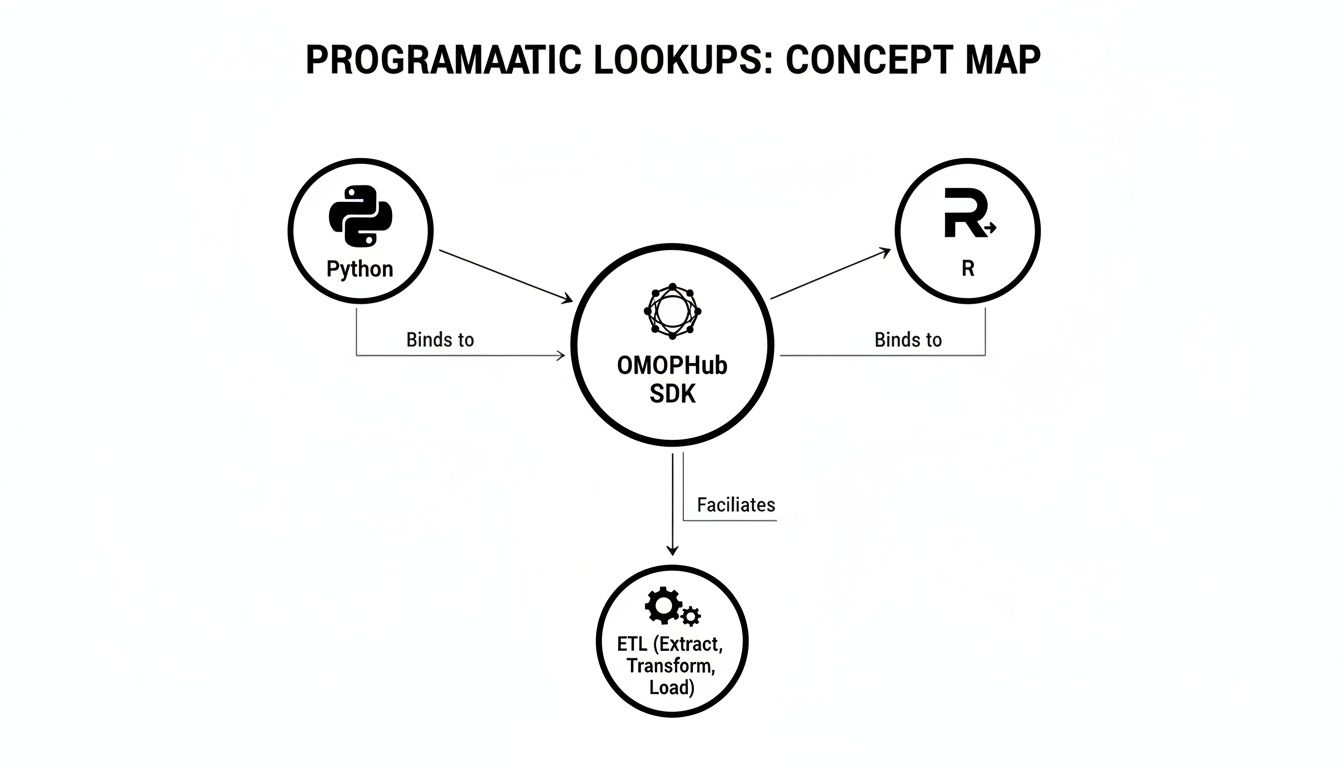
As the map shows, whether you're working in Python or R, a good SDK provides a common, efficient path for embedding these complex vocabulary searches directly into your automated data workflows.
Traversing Hierarchical Relationships
One of SNOMED CT's most valuable features is its polyhierarchical structure. This just means a single clinical idea can have multiple "parent" concepts, creating an incredibly rich network. A common and essential task is to traverse this hierarchy to find all the "child" concepts-the descendants-of a broader category.
For example, a researcher might need to identify every patient with any form of cancer. Instead of trying to list hundreds of specific cancer codes, they can just run one query to find all descendants of the high-level concept "Neoplasm" (Concept ID: 438112). This kind of hierarchical query is fundamental to building accurate and complete value sets for things like quality measures or research studies.
Practical Tips for Refining Your Search
Getting precise results is all about smart filtering. When you're running a programmatic lookup, you can dramatically improve the relevance of the concepts you get back by applying a few filters.
- Filter by Vocabulary Version: Lock your query to a specific vocabulary version. This is critical for making your work reproducible down the line.
- Filter by Domain: Need diagnoses? Restrict your search to the 'Condition' domain to cut out the noise from procedures, drugs, or observations.
- Filter by Concept Class: For an extra layer of precision, you can target a specific class, like 'Clinical Finding', to refine your search even further.
For a deep dive into all the available filters and parameters, the OMOPHub API documentation is the go-to resource. It's incredibly helpful.
When building a value set for a clinical quality measure, a great pro-tip is to start broad. Grab a high-level concept like 'Hypertensive disorder' and find all its descendants. Then, use domain and concept class filters to methodically weed out what you don't need. You'll end up with a list that's both comprehensive and precise.
Mapping Across Vocabularies
Another crucial advanced skill is cross-vocabulary mapping. In the real world, you constantly need to translate a SNOMED CT concept into another coding system, like ICD-10-CM for billing or regulatory reporting. This process is the bedrock of connecting rich clinical data with administrative and financial systems.
For instance, a hospital EHR might capture a diagnosis using the SNOMED CT code for "Acute myocardial infarction" (Concept ID: 4329847). To get paid, that clinical term has to be mapped to its corresponding ICD-10-CM code. Getting these mappings right is also vital for bigger data integration projects, a topic we cover in our article on semantic mapping in healthcare.
This need for interoperability goes way beyond billing. A recent strategic collaboration between SNOMED International and the GMDN Agency is a perfect example, aiming to create a GMDN–SNOMED CT Extension for medical devices. This initiative will replace outdated linkage tables and improve how clinical data about devices can be used for things like regulatory oversight and post-market safety surveillance. You can read more about this important collaboration on the SNOMED International site.
Getting Integration and Compliance Right
Integrating a snomed ct codes lookup function into a production system is about more than just making an API call. You're building a critical piece of infrastructure that has to be reliable, secure, and ready for regulatory oversight. If you don't get this right from day one, you're setting yourself up for serious data integrity problems and compliance headaches later on.
One of the biggest pitfalls I see is a failure to manage vocabulary versioning. Clinical terminologies aren't set in stone; they're constantly updated. If you're using an old version, you'll start to see data drift. An analysis you run today could give you a completely different answer than the same query six months from now, which completely undermines the reproducibility of your research and the reliability of your analytics.
Keeping Your Data Consistent and Secure
This is exactly the kind of problem services like OMOPHub are built to solve. They stay automatically synced with the latest official OHDSI ATHENA releases, taking the manual update burden off your team. This guarantees you're always working with the most current, validated concepts. The specifics of how they manage versions are laid out in the OMOPHub documentation.
Of course, versioning is just one piece of the puzzle. When you're working with any API, solid error handling and rate limiting are non-negotiable. Your integration needs to be smart enough to handle a network timeout or a weird API response without bringing down your entire ETL pipeline.
And for anyone in an enterprise or compliance role, security is everything. A crucial first step here is understanding what constitutes Protected Health Information (PHI), because SNOMED CT codes-when tied to a patient-absolutely fall into that category.
OMOPHub was clearly designed with this in mind. It offers features like end-to-end encryption for all data in transit and keeps immutable audit trails with a seven-year retention policy. These aren't just nice-to-haves; they are essential controls for meeting strict HIPAA and GDPR requirements by giving you a verifiable log of all vocabulary access.
A Production Readiness Checklist
Before you push any vocabulary-dependent solution live, it’s worth running through a final check. This is something every data platform manager or EHR product team should do to make sure the integration isn't just working, but is truly resilient and compliant.
Here's what I'd look for:
- Authentication: How are you managing API keys? They should never be hardcoded. Use environment variables or a dedicated secrets manager instead.
- Error Handling: Is your code wrapped in try-catch blocks? You need a plan for gracefully handling API errors and network hiccups.
- Performance Monitoring: Are you logging API response times? This is the only way to spot and fix bottlenecks before they become major issues.
- Compliance Alignment: Does your service provider give you the tools you need-like audit trails and encryption-to meet your organization's HIPAA/GDPR obligations?
- Scalability: Can the API actually handle your workload? Think about everything from large, overnight ETL jobs to the real-time queries happening in a user-facing application.
Thinking through these points methodically will give you the confidence that your snomed ct codes lookup is not only powerful but also built to last.
FAQ
Working with SNOMED CT and the OMOP CDM inevitably brings up a few common questions, especially for newcomers. Let's tackle some of the ones I hear most often from developers and researchers.
What's the Real Difference Between Standard and Non-Standard Concepts?
This is probably the single most important concept to grasp for reliable analytics. Think of a standard concept as the one officially blessed term for a clinical idea within the OMOP Common Data Model. It's the "master" code you should always use for your analysis.
Everything else-synonyms, abbreviations, or codes from other source terminologies-are considered non-standard. These all point or "map" to that single standard concept. Your goal is to always resolve your source data to its standard SNOMED CT equivalent to keep your analysis clean and consistent.
My Go-To Tip: When you're using the OMOPHub SDKs, make your life easier by always including the
standard_concept=["S"]filter in your queries. It’s a simple parameter, but it forces the lookup to return only the correct, analysis-ready concepts. This small habit will save you a world of data-cleaning headaches down the road. You can see this and other parameters in the official OMOPHub documentation.
How Do I Keep Up with SNOMED CT Version Updates?
Frankly, managing vocabulary updates yourself is a massive pain. The OHDSI ATHENA vocabularies are updated on a regular schedule, and if your local copy falls behind, it can seriously mess with the accuracy and reproducibility of your work.
This is where a managed service like OMOPHub really shines. The platform handles all the updates automatically, rolling out the latest official ATHENA release behind the scenes. This means every snomed ct codes lookup you run hits the most current and accurate set of concepts, relationships, and mappings-with zero database maintenance from your end.
Can I Search for Codes Within a Specific SNOMED CT Extension, Like the US Edition?
Absolutely. This isn't just a nice-to-have; it's often a requirement for applications that need to follow national healthcare guidelines. SNOMED CT has its core international release, but it also has country-specific extensions, like the well-known SNOMED US edition.
You can easily target these extensions. When you run a search, just specify the vocabulary_id. This works both in the web-based OMOPHub Concept Lookup tool and when you're hitting the API with our SDKs for Python or R. It's a critical feature for ensuring the concepts you're using are actually relevant to a specific country's system.
Tired of the infrastructure headaches that come with managing medical vocabularies? OMOPHub gives you instant API access to SNOMED CT and other ATHENA terminologies so your team can focus on building, not on database maintenance. Get started at https://omophub.com.