A Developer's Guide to Mastering the NDC Lookup
 Dr. Lisa Martinez
A proper NDC lookup is more than just a simple translation; it's the critical first step in turning raw pharmaceutical codes into standardized, usable information for healthcare data analysis. Getting this right from the start prevents a cascade of data corruption issues down the line, ensuring that your analytics, research, and clinical applications are built on a solid foundation.
Why the NDC Lookup Is Mission Critical in Healthcare Data
On the surface, the National Drug Code (NDC) seems straightforward-a universal identifier for drugs in the United States. But for developers and data engineers working in the trenches, treating an NDC as just another character string is a classic rookie mistake. Real-world electronic health record (EHR) data is notoriously messy, filled with inconsistencies that can easily break data pipelines and skew analytical results.
A simple string match just won't cut it. The problems you'll face are often rooted in a few common, yet stubborn, issues.
- Inconsistent Formatting: You'll see NDCs in both 10-digit and 11-digit formats, and they need to be algorithmically normalized to a standard representation before you even attempt a lookup.
- Custom Local Codes: Many hospitals and health systems cook up their own internal codes for things like compounded or repackaged drugs. These "local" codes have no national counterpart and will fail a standard lookup.
- Data Entry Errors: Typos happen. Manual data entry guarantees you'll encounter invalid codes that need to be caught and managed gracefully to keep your ETL process from crashing.
The Real-World Impact of Inconsistent Drug Codes
The NDC system, born from the Drug Listing Act of 1972, is the standard. Yet, how it's used in practice is anything but standard. One deep-dive into various drug knowledge bases revealed that the count of unique NDCs swung wildly from 113,221 to 232,111 depending on the source.
Coverage for outpatient prescriptions was decent, ranging from 93.0% to 99.8%. But in the inpatient world, it plummeted to between 77.4% and 97.0%. The culprit? Those custom local codes, which accounted for a staggering 94% of the unmatched drugs in some cases.
The table below breaks down some of the most common challenges I've personally run into when working with NDCs and what they really mean for your data pipeline.
Common NDC Lookup Challenges and Their Impact
| Challenge | Description | Impact on Data Pipeline |
|---|---|---|
| Formatting inconsistencies | NDCs appear in 10-digit, 11-digit, and hyphenated forms, requiring a normalization step. | ETL jobs fail or misclassify drugs if a standard format isn't enforced upstream. |
| Deactivated NDCs | Codes for discontinued or repackaged drugs still exist in historical data but won't map to an active concept. | Can lead to incomplete patient medication histories and skewed longitudinal analysis. |
| "Local" or "J-codes" | Health systems create proprietary codes for internal use that don't exist in national vocabularies. | Results in significant data gaps; these drugs are effectively invisible to standard queries. |
| Typographical errors | Simple manual entry mistakes create invalid codes that don't match anything. | Causes record rejection, requiring manual review and data remediation cycles. |
Ignoring these issues isn't an option if you want reliable data. This is where the Observational Medical Outcomes Partnership (OMOP) Common Data Model truly shines. By mapping messy source NDCs to a standardized vocabulary like RxNorm, the OMOP model establishes a single source of truth. This mapping process is what ensures "Aspirin 81 MG Oral Tablet" is recognized as the same clinical drug, no matter the manufacturer, package size, or original NDC.
A robust NDC lookup process isn't just a technical task; it's a foundational requirement for semantic interoperability. Without it, you cannot reliably conduct research, perform pharmacovigilance, or build accurate patient cohorts.
Ultimately, a programmatic, vocabulary-aware approach is the only way to build scalable and trustworthy healthcare applications. This commitment to data integrity is just as important as implementing Essential Cybersecurity Practices for Healthcare Providers to protect patient information and maintain compliance.
Alright, let's get down to business and see how this works in practice. The most fundamental operation you'll perform is looking up a single NDC code. Think of it as the atomic unit of your drug data workflow. Everything else-from massive ETL pipelines to intricate clinical analyses-is built on top of this simple action. If you can't get a precise match for one code, building a reliable system is next to impossible.
The OMOPHub SDKs make this incredibly straightforward. Whether you're a Pythonista, an R guru, or a TypeScript developer, the pattern is the same: you give it an NDC, and it gives you back the standardized OMOP Concept. This completely sidesteps the headache of maintaining your own local vocabulary database or wrestling with the nuances of different NDC formats.
Python Example for a Single NDC Lookup
Let’s walk through a real-world example in Python. Say we need to find the concept for a specific drug, the Airsupra inhaler, which has the NDC 0310-9080-12.
Here’s the code to do just that:
from omophub.client import Client

# Initialize the client with your API key
client = Client(api_key="YOUR_API_KEY")

# Perform the NDC lookup
try:
    concept = client.vocabulary.lookup(
        source_code="0310-9080-12",
        source_vocabulary_id="NDC"
    )
    print(f"NDC: {concept.concept_code}")
    print(f"Concept ID: {concept.concept_id}")
    print(f"Concept Name: {concept.concept_name}")
    print(f"Vocabulary: {concept.vocabulary_id}")
except Exception as e:
    print(f"An error occurred: {e}")
This snippet is pretty simple. It sets up the client, calls the lookup function with our target NDC and its vocabulary ("NDC"), and then prints out the key details from the response. That concept_id is the golden ticket-it's the standardized integer that lets you link this drug to other tables throughout the OMOP CDM.
By the way, if you’re mapping other code systems, the process is very similar. We have a guide on the ICD-9-DX code lookup that demonstrates the same principles.
The OMOPHub documentation provides a great visual breakdown of the different parameters you can use to really narrow down your searches.
As you can see, you can filter by domain, concept class, and more to make sure your NDC lookup hits the exact target you're aiming for.
Tips for Refining Your Lookups
To get the most out of your queries, keep a couple of things in mind:
- Dig into the Query Parameters: Don't stop at
source_codeandsource_vocabulary_id. You can add filters likedomain_id(e.g., 'Drug') to weed out irrelevant results. The best place to see all the options is the official OMOPHub documentation. - Plan for "Not Found" Scenarios: It's a fact of life-not every NDC you look up will have a match. Some are invalid, others are retired. Your code needs to handle these cases gracefully, either through exception handling or by checking for an empty response, so your entire application doesn't grind to a halt.
The point of an NDC lookup isn't just to find any match; it's to find the correct, standardized concept. The details in the API response-like
concept_id,concept_name,vocabulary_id, anddomain_id-are your tools for validating the result and ensuring it fits perfectly into your downstream data models.
Mapping NDCs to Standard RxNorm Concepts
Getting a specific concept_id from an NDC lookup is a great first step, but the real analytical magic happens when you map that code to a standardized clinical vocabulary like RxNorm. This is the crucial bridge between a manufacturer's product code and its actual clinical meaning. It's what allows you to group drugs for analysis, regardless of who made them or what size the bottle is.
This mapping is the key to true semantic interoperability. Think about it: multiple NDCs for "Lisinopril 20mg Tablet" from different drug companies are, on their own, just a bunch of disconnected codes. But once you map them all to a single RxNorm "Ingredient" or "Clinical Drug Form" concept, you can finally analyze all lisinopril exposures together as one cohesive group.
The journey from a raw NDC to its standardized OMOP concept_id is a clear, repeatable process, especially when handled by an API.
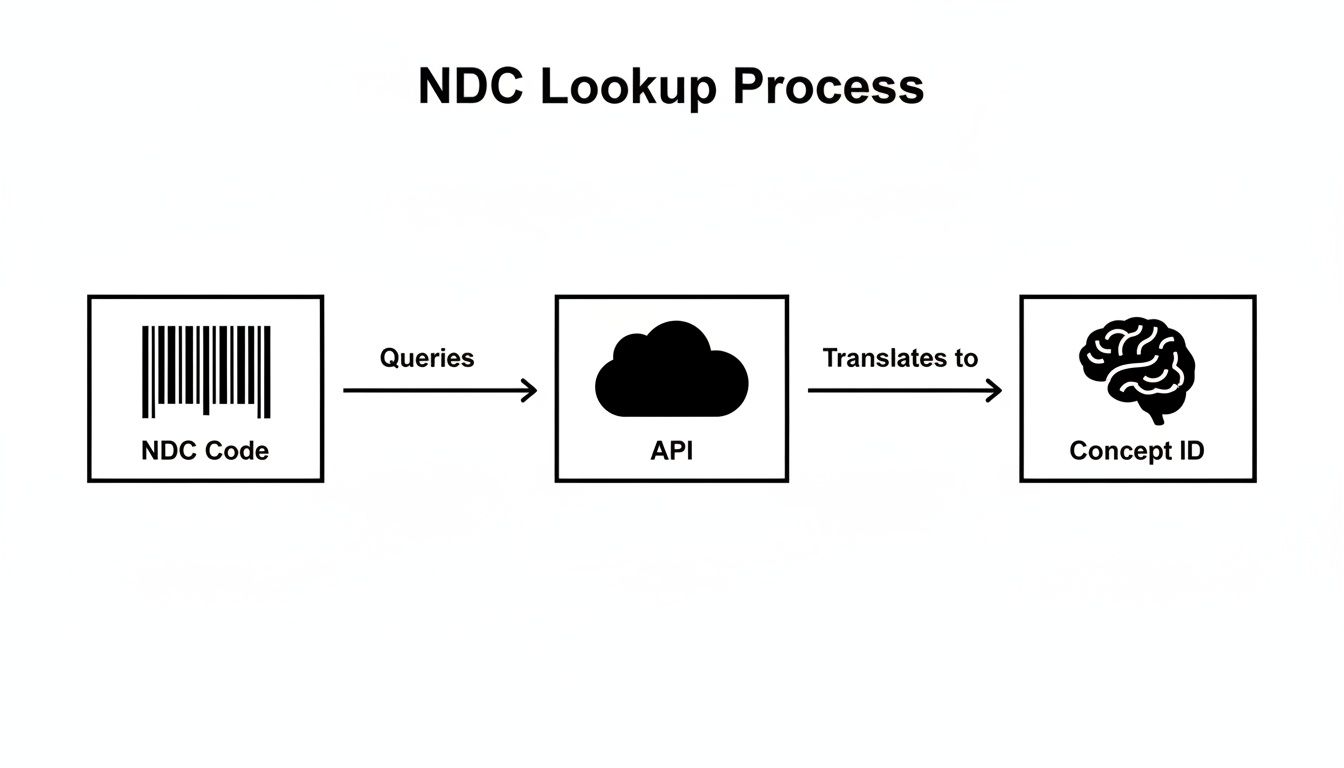
As you can see, a programmatic lookup abstracts away the underlying complexity. It cleanly transforms a simple product barcode into a powerful, machine-readable clinical entity-the fundamental mechanism for correctly populating the DRUG_EXPOSURE table in the OMOP CDM.
Navigating Concept Relationships
The OMOP vocabulary isn’t just a flat list of codes; it's a rich network of relationships that connect concepts. To get from an NDC to the right RxNorm target, you have to know how to walk through these relationships. Fortunately, the OMOPHub SDKs make this exploration straightforward.
In practice, the path usually looks like this:
- Start with the NDC: You begin with the
concept_idyou got from your initial NDC lookup. - Find the 'Maps to' link: You then search for relationships like 'Maps to' that point from the NDC concept to a standard concept, which is almost always in RxNorm.
- Climb the hierarchy: From that initial RxNorm concept (say, a 'Branded Drug'), you can follow 'Is a' or 'Constitutes' relationships to find more general concepts, like 'Clinical Drug' or 'Ingredient'.
This process has been a cornerstone of health data interoperability for years. A landmark study of 66 million dispensings in Indiana Medicaid showed that while unique NDC coverage hovered around 74.5%-80.9%, the volume coverage was a massive 97.3%-98.7%. This tells us that while there are a lot of obscure NDCs out there, the most frequently used drugs are incredibly well-covered. You can dig into the full findings on NDC coverage to learn more.
Practical Code Examples for Mapping
Let’s look at how you can programmatically navigate these relationships with the OMOPHub Python SDK. In this example, we’ll start with an NDC concept_id and find its corresponding RxNorm ingredient.
from omophub.client import Client

# Initialize the client with your key
client = Client(api_key="YOUR_API_KEY")

# Let's use the Concept ID for NDC 0310-9080-12, which we found earlier is 35891393
start_concept_id = 35891393

try:
    # Find relationships for this concept
    # We're specifically looking for where it maps to and what its ingredient is
    relationships = client.vocabulary.get_relationships(
        concept_id=start_concept_id,
        relationship_id=["Maps to", "RxNorm has ingredient"]
    )
    for rel in relationships:
        print(f"Relationship: '{rel.relationship_id}'")
        print(f"  -> Maps to Concept ID: {rel.concept_id_2}")
        print(f"  -> Concept Name: {rel.concept_name_2}")
        print(f"  -> Vocabulary: {rel.vocabulary_id_2}")
except Exception as e:
    print(f"An error occurred: {e}")
Pro Tip: When you're mapping, the 'Maps to' relationship is always your best starting point for finding the standard equivalent of a source code. From there, traversing the 'Is a' hierarchy is how you dial in the right level of clinical granularity for your analysis, whether that's the specific drug form or the core active ingredient. For a much deeper dive, check out our guide on semantic mapping strategies.
By taking this programmatic approach, you ensure your data isn't just identified but is also clinically harmonized, setting the stage for powerful, large-scale research.
Optimizing Bulk Lookups for ETL Pipelines

Real-world healthcare data doesn't come in neat little packages. We're talking about millions of patient encounters and medication records, and in that environment, looking up NDCs one by one is a recipe for disaster. Any data ingestion process would grind to a halt.
To handle this kind of scale, you have to shift your thinking from single, synchronous requests to efficient bulk processing right inside your ETL (Extract, Transform, Load) pipeline. This means structuring your code to handle entire lists or dataframes of NDCs at once. A solid understanding of building robust data pipelines is the foundation here. Your goal is to push through as much data as possible without overwhelming the API or having the whole thing fall over when you hit an error.
Batching Requests and Managing Rate Limits
The most reliable strategy for bulk operations is batching. Instead of hammering an API with a million individual calls, you group NDCs into manageable chunks-maybe 1,000 at a time-and process them in sequence or even in parallel. The difference in network overhead is night and day, and it’s a much more considerate way to interact with the API server.
Of course, batching goes hand-in-hand with managing API rate limits. If you exceed the allowed request frequency, you’ll get temporarily blocked, which can easily cause your entire pipeline to fail. Any script worth its salt needs to anticipate this. It should have built-in logic to catch rate-limiting errors (like an HTTP 429 status code), pause for a moment, and then retry the request.
The OMOPHub SDKs are designed to make this easier. You can dig into the documentation for the Python SDK or the R SDK to see how to implement these practices directly.
Python Code for Bulk NDC Processing
Let’s look at a practical Python example. Here, we'll use pandas to process a dataframe full of NDCs, demonstrating a simple batching approach and, just as importantly, handling errors for codes that don't map correctly.
import pandas as pd
from omophub.client import Client

# Initialize the client with your API key
client = Client(api_key="YOUR_API_KEY")

# Example dataframe with a column of NDCs
data = {'source_ndc': ['0310-9080-12', '99999-9999-99', '0078-0441-05']}
df = pd.DataFrame(data)

def get_concept_id(ndc):
    """Function to perform a single lookup and handle errors."""
    try:
        concept = client.vocabulary.lookup(
            source_code=ndc,
            source_vocabulary_id="NDC"
        )
        return concept.concept_id
    except Exception:
        return None # Return None if NDC is not found or an error occurs

# Apply the function to the entire 'source_ndc' column
df['omop_concept_id'] = df['source_ndc'].apply(get_concept_id)

print(df)
This is a robust way to work. If the script hits an invalid NDC, it won't crash the entire job. Instead, it just inserts a None value, which can be flagged for your data quality team to investigate later.
Pro Tip for Maximum Throughput: When you absolutely need to squeeze every drop of performance out of your pipeline, go asynchronous. Libraries like
asyncioin Python let you fire off multiple API requests at the same time without waiting for each one to finish. This can slash the total processing time for massive datasets. For more on this, the OMOPHub API documentation has detailed guidance on asynchronous patterns.
Navigating Edge Cases and Ensuring Compliance
A successful NDC lookup isn't just about finding a match. It's about knowing how to handle the inevitable exceptions that will otherwise break your ETL scripts. Things like retired codes, repackaged drugs, and weird formatting issues are where data pipelines most often fail. If you want to build a resilient system, you have to anticipate these challenges from the start.
For instance, your data will absolutely contain NDCs for drugs that have been discontinued or recalled. These retired NDCs won't map to an active concept, but they're still legitimate historical data points. A smart script won't just discard them; it will log them for review to make sure no patient data is silently dropped. In the same vein, repackaged NDCs from third-party distributors require careful mapping to trace them back to the original manufacturer's product concept.
The 10 vs 11 Digit Dilemma
One of the most persistent headaches is the confusion between 10- and 11-digit NDC formats. You'll see both in the wild, but the 11-digit format is the standard for billing and claims processing. This means you need to correctly pad a leading zero into the right segment-get it wrong, and your lookups will fail.
In the high-stakes world of healthcare billing, the numbers tell the story. A huge majority of medications-often over 95% in critical datasets-depend on the 11-digit NDC format for smooth operations. Data from outpatient sources is just as telling, with coverage consistently above 93%. This really drives home why getting NDC lookups right is non-negotiable for cutting down errors in EHR integrations and claims. You can get more details on NDC formatting standards on careset.com.
Maintaining Temporal Consistency with Versioned Vocabularies
If you're working on a longitudinal study that spans several years, vocabulary versioning is absolutely critical. The drug landscape is always in flux, with new NDCs being issued and old ones retired. Using a single, static vocabulary snapshot for a multi-year dataset can introduce serious analytical errors. An NDC that was valid in 2018 might not be in 2024, and your analysis needs to reflect that reality.
This is a problem OMOPHub was built to solve. It provides version-synced vocabularies, which lets you perform an NDC lookup that is historically accurate for the date the data was recorded. This is key for ensuring temporal consistency and making sure your research is reproducible.
Tip: When performing historical lookups, always align the vocabulary version with the
drug_exposure_start_datefrom your source data. This simple step prevents anachronistic mapping errors that can invalidate research findings. To see how this works in practice, explore the OMOPHub API documentation for version-aware queries.
Upholding Security and Compliance
As soon as your NDC lookup process touches Protected Health Information (PHI), you're in a world governed by regulations like HIPAA and GDPR. Compliance isn't optional, and your data infrastructure has to protect patient data at every turn.
OMOPHub was designed with these responsibilities in mind, with critical security features built into its core:
- End-to-end encryption safeguards data whether it's moving across the network or sitting in a database.
- Immutable audit trails create a permanent, unchangeable log of all API activity, backed by a seven-year retention policy to meet stringent compliance rules.
These features give you the tools to build powerful and compliant data systems without having to manage the complex security infrastructure yourself. By thinking through these edge cases and compliance needs upfront, your NDC lookup process evolves from a simple script into a reliable, enterprise-grade foundation for your entire healthcare data platform.
Wrestling with Common NDC Lookup Questions
Even when you've got the basics down, certain quirks of NDC lookups can throw a wrench in your data pipeline. Let's walk through some of the most common questions and roadblocks I've seen developers run into when mapping NDCs to RxNorm within the OMOP Common Data Model.
What Do I Do When an NDC Lookup Comes Up Empty?
It happens all the time: you run a lookup and get nothing back. This isn't necessarily an error. More often than not, it's because the code is invalid, a temporary code from a hospital's internal formulary, or a retired NDC for a product that's no longer on the market.
Your first priority should be to prevent this from crashing your entire ETL process. The best practice here is to log these non-matches for a data quality team to investigate later. In your mapping logic, you can assign these to the OMOP concept ID 0, which is the designated value for "No matching concept." This keeps your pipeline moving while cleanly flagging the records that need a human to figure out what went wrong.
What's the Real Difference Between an NDC and an RxNorm CUI?
This is probably the most crucial distinction to get right for any kind of clinical analysis. Think of an NDC as a barcode for a specific box on a pharmacy shelf. It identifies the product from a single manufacturer, right down to the package size.
An RxNorm Concept Unique Identifier (CUI), on the other hand, is a clinical idea. It represents the active ingredient, strength, and dose form, completely separate from the company that made it. For instance, dozens of different NDCs for "Metformin 500mg Oral Tablet" from various manufacturers will all point to the exact same RxNorm CUI. This normalization is what makes meaningful analysis possible.
The NDC tells you what was sold, while the RxNorm CUI tells you what the drug actually is. For robust analytics, you have to translate from the administrative code to the clinical concept.
Why Should I Care About Vocabulary Versioning?
Drug vocabularies are constantly in flux. New products hit the market, old ones are pulled, and codes get updated. Now, imagine you're running a longitudinal study with data spanning from 2015 to 2025. An NDC that was perfectly valid in 2016 might be retired by 2023.
If you map all your data against a single, current version of the vocabulary, you're going to miss things. You'll fail to map older codes, potentially misclassifying drugs and compromising your results. A version-aware NDC lookup service is like a time machine for your data; it checks the code against the vocabulary version that was active when the prescription was written. This is non-negotiable for ensuring your research is both historically accurate and reproducible.
For a closer look at how to implement version-aware queries, the official OMOPHub API documentation has some great examples.
Ready to eliminate the complexity of vocabulary management and build robust, compliant healthcare applications? OMOPHub provides instant API access to the complete OHDSI ATHENA vocabularies, enabling you to perform powerful NDC lookups and semantic mappings in minutes.